Akil Mutawakkil.
CurrentlyAI Product Designer & Manager @ ChatDaddy
Based inBondowoso, Indonesia
All projects
Case study · Lingble · 2021 - 2024

A mini cart and checkout with less friction

The mini cart is key to a seamless shopping experience, but its current design adds friction and can lead to cart abandonment.

4mini-cart problems fixed
6checkout problems addressed
1screen showing every checkout step
+ / –inline quantity controls instead of a dropdown
Checkout SFCC Improvement V2 cover
01

The problem

01

Too Many Steps

Users must navigate extra pages to input promo codes or see shipping fees, slowing down their path to checkout.
02

Lack of Transparency

Without reward points or shipping costs displayed, users may be surprised by the final price, increasing abandonment risk.
03

Cumbersome Quantity Adjustments

The dropdown for quantity changes is unintuitive; simple “+” and “–” buttons would be quicker and more user-friendly.
04

Disorganized Action Buttons

Separating “View Cart” and “Checkout” adds redundancy; combining them streamlines navigation.

Updating the mini cart will improve usability, reduce abandonment, and encourage faster, more confident purchasing decisions.

02

Mini cart

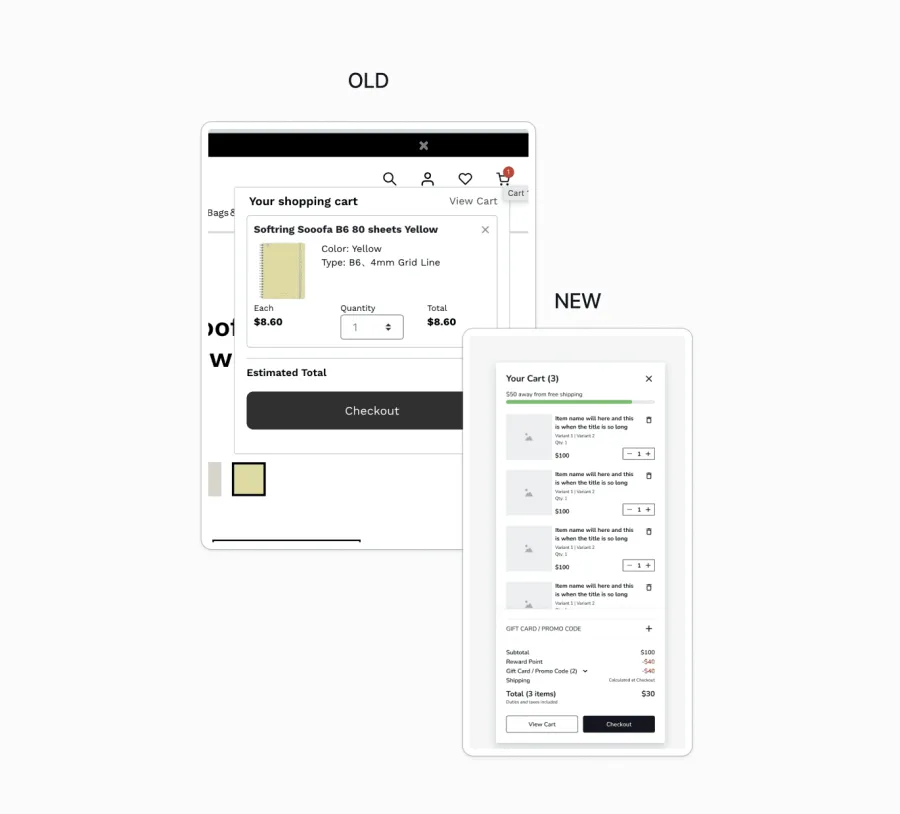
Current Mini Cart Issues:

01
Dont have promo code input = needs to have extra steps to input in checkout page
02
View Cart and Checkout is in separate sections = its have the same purpose so its should be in the same group
03
Doesnt show reward point and shipping fee
04
QTY adjustment is not effective since its dropwown

Solutions:

01

Add Promo Code Input

Allow promo codes to be applied directly in the mini cart with instant discount feedback, reducing extra steps and increasing transparency.
02

Group “View Cart” and “Checkout”

Combine these options in a unified layout, with “Checkout” as the primary action for a clearer path to purchase.
03

Show Reward Points & Shipping Fees

Display available reward points and estimated shipping costs in the mini cart to manage expectations and reinforce savings.
04

Improve Quantity Adjustment

Replace dropdowns with inline “+” and “–” buttons for simpler quantity changes, with real-time total updates.

These changes streamline navigation, improve clarity, and reduce cart abandonment.

Checkout SFCC Improvement V2
03

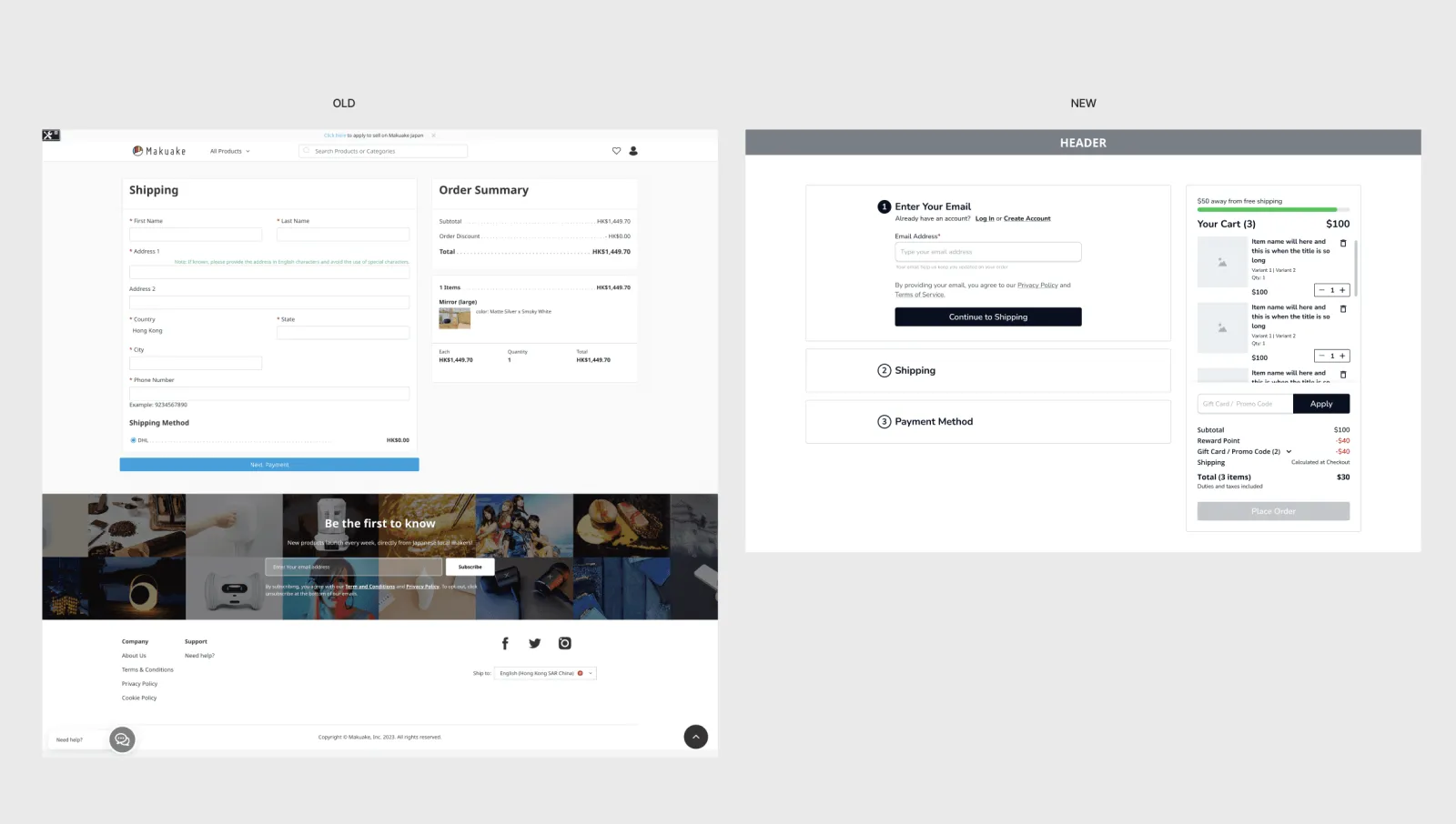
Checkout flow

Current Issues in the Checkout Process:

01

Lack of Step Indicators

Users are unaware of how many steps remain, creating uncertainty in the checkout process.
02

Non-Clickable Product Card

Users cannot click on product cards to view details, forcing them to exit the checkout to confirm product information, which can disrupt the purchase flow.
03

No Quantity Adjustment Option

Users are unable to adjust item quantities within checkout, requiring them to leave the checkout page and potentially decreasing completion rates.
04

No Option to Remove Items

Users cannot remove items from the cart during checkout, adding friction if they need to make last-minute changes.
05

No Promo Code Input

Promo codes cannot be applied during checkout, forcing users to go back to a previous page, which complicates the process.
06

Limited Quick Login or Email Entry for Order Tracking

Users are unable to quickly log in or enter their email to track their order, reducing opportunities for engagement, subscription sign-ups, and newsletter opt-ins.

Addressing these issues can streamline the checkout process, improve user experience, and increase completion rates.

Improved Checkout Process:

01

Display All Steps in One Screen

Provide a clear visual indicator of each step in the checkout process, giving users a sense of progress and reducing uncertainty.
02

Clickable Product Cards

Make product cards clickable, opening in a new tab to allow users to view product details without leaving the checkout flow.
03

Enable Quantity Adjustments

Allow users to adjust item quantities directly within the checkout, streamlining the process and keeping them engaged.
04

Promo Code Input

Add a promo code input field within the checkout, making it easy for users to apply discounts without navigating away.
05

Item Removal Option

Enable item removal from the cart within checkout, reducing the need to exit and helping maintain user focus, thus supporting higher conversion rates.
06

Email Input for Quick Login and Engagement

Allow users to enter an email for tracking and engagement purposes, encouraging logins, subscriptions, and newsletter sign-ups to increase customer retention and loyalty.

These improvements simplify the checkout process, enhance user experience, and support higher conversion and engagement rates.
Checkout SFCC Improvement V2
Got questions?

Let's build products
that actually think.

I’m always excited to collaborate on innovative and exciting projects.

Phone+62 852 2845 4057